


Applying for a job today feels like sending a message into an empty room. You spend hours tailoring your experience, checking for typos, and writing a customized cover letter, only to receive an automated rejection email just minutes later. The culprit behind this frustrating experience is almost always the Applicant Tracking System.
By 2026, these systems have moved far beyond the simple keyword scanners of the past decade. They are now sophisticated AI evaluators that read and interpret your career story. If you want to get noticed, you need an ATS-friendly resume 2026 version that satisfies both the algorithm and the human recruiter waiting on the other side.
Getting past the bot is the very first hurdle in a modern job search. These systems serve as the primary filter for nearly all major companies, managing the massive influx of applications they receive daily. Without a clear understanding of how they parse data, even the most qualified candidates stay hidden in the digital reject pile. This guide explores the technical shift in hiring practices and provides a practical blueprint for building a resume that stands out in a crowded digital landscape. You will learn exactly how to format your text, choose your words, and present your value so that the machine pushes your application to the top of the stack.
What is an ATS? The Digital Filter of Modern Hiring
The Core Functions of Modern Tracking Systems
An Applicant Tracking System is a software platform that handles the heavy lifting of the recruitment process from start to finish. It collects, sorts, and ranks thousands of applications so recruiters do not have to read every single one manually. In the current job market, your application must be designed to pass through layers of automated screening before a human ever sees your name. These systems look for specific data points like job titles, years of experience, core competencies, and educational background to determine your match score.
The technology has shifted from basic database storage to active intelligence. Modern platforms use predictive analytics to guess how long a candidate might stay at a company based on their work history patterns. This means your resume is not just a history of where you have been; it is a data set that the bot uses to project your future value. Understanding this mechanism is the only way to ensure your application actually reaches a human desk.
Why Layout Simplicity Wins Every Time
Many job seekers try to stand out with creative designs, adding headshots, colorful sidebars, and custom graphics, but this almost always backfires. When an ATS parses a resume, it strips away all the pretty parts to find the raw text underneath. If your contact info is tucked inside a graphic element or a header section, the bot might think you forgot to include a phone number or email address.
A clean, top-to-bottom text flow ensures the software correctly identifies your professional milestones without getting confused by columns or text boxes. Complex layouts force the parser to guess the reading order, which often results in your job titles being mixed up with your company names or dates. Keeping the layout incredibly simple guarantees that your information transfers perfectly from your document into the recruiter’s database profile.
|
Feature |
Description |
Impact on Candidate |
|
Parsing Engine |
Converts document text into structured data. |
Layout must be simple to avoid data corruption. |
|
Semantic Search |
Understands context and related industry terms. |
Keywords matter, but context matters more. |
|
Ranking Algorithm |
Scores candidates based on job description alignment. |
High scores lead to immediate recruiter notification. |
|
Automated Triggers |
Sends rejections based on specific missing criteria. |
Missing essential skills leads to instant rejection. |
How ATS Technology Has Changed for 2026
From Static Matching to Contextual Intelligence
The year 2026 marks a turning point where basic keyword stuffing is completely dead and ineffective. Older systems were easily fooled by applicants hiding invisible white text at the bottom of the page or just repeating the same skill a dozen times. Today’s systems are powered by Large Language Models that understand human intent and read context just like a real person would. They can easily tell the difference between someone who actually managed a large-scale project and someone who just put the word manager on their page out of nowhere.
This massive shift requires a much more honest, descriptive, and context-rich approach to resume writing. We are seeing a heavy move toward skills-first hiring, where bots look for evidence of your abilities rather than just checking if you have a specific university degree. They analyze the bullet points under your job titles to see if the daily work you did actually matches the core skills you claim to have at the top of the page.
The Power of Semantic Search in Job Hunting
Semantic search means the bot knows that customer success and client relations are nearly the exact same thing in the business world. You no longer have to guess the precise word a recruiter typed into the system when they created the job posting. However, it is still a very smart strategy to mirror the exact language of the job post whenever possible. Doing this helps the artificial intelligence confirm that you are speaking the same industry language as the hiring team.
It also recognizes tool ecosystems. For example, if a job requires front-end development, the bot knows to look for HTML, CSS, React, and Angular, even if the job description only mentioned a few of them. It groups related concepts together to build a complete profile of your technical competency. If there is a huge mismatch between your listed skills and your actual experience descriptions, the AI will lower your ranking score significantly.
|
2020 Era Systems |
2026 AI Systems |
|
Looked for exact keyword matches. |
Understands related skills and synonyms. |
|
Easily confused by multi-column layouts. |
Better at parsing, but still prefers linear flow. |
|
Focused on recent job titles only. |
Analyzes total career trajectory and skill growth. |
|
Manual screening for cultural fit. |
AI sentiment analysis checks for soft skills in tone. |
The Essentials of an ATS-Friendly Resume Design
Formatting Rules for Digital Success
To build a high-ranking application, you absolutely must follow a specific structural logic from top to bottom. The bot reads your document exactly like a piece of computer code, and if that code is messy, the output is a blank or broken profile. Start by choosing a highly readable, standard font like Arial, Calibri, or Georgia. Avoid using the designated header and footer spaces in your word processor for your contact information, as many older versions of enterprise software still ignore those sections entirely.
Stick to a single-column format to ensure the reading order remains intact when the machine scans from left to right. When you use columns, the system often mashes the left side and the right side together, turning your careful bullet points into a garbled, unreadable paragraph. A simple, linear layout might look a bit boring to you, but it is a massive relief to the machine trying to process your data quickly.
Standardizing Your Section Titles
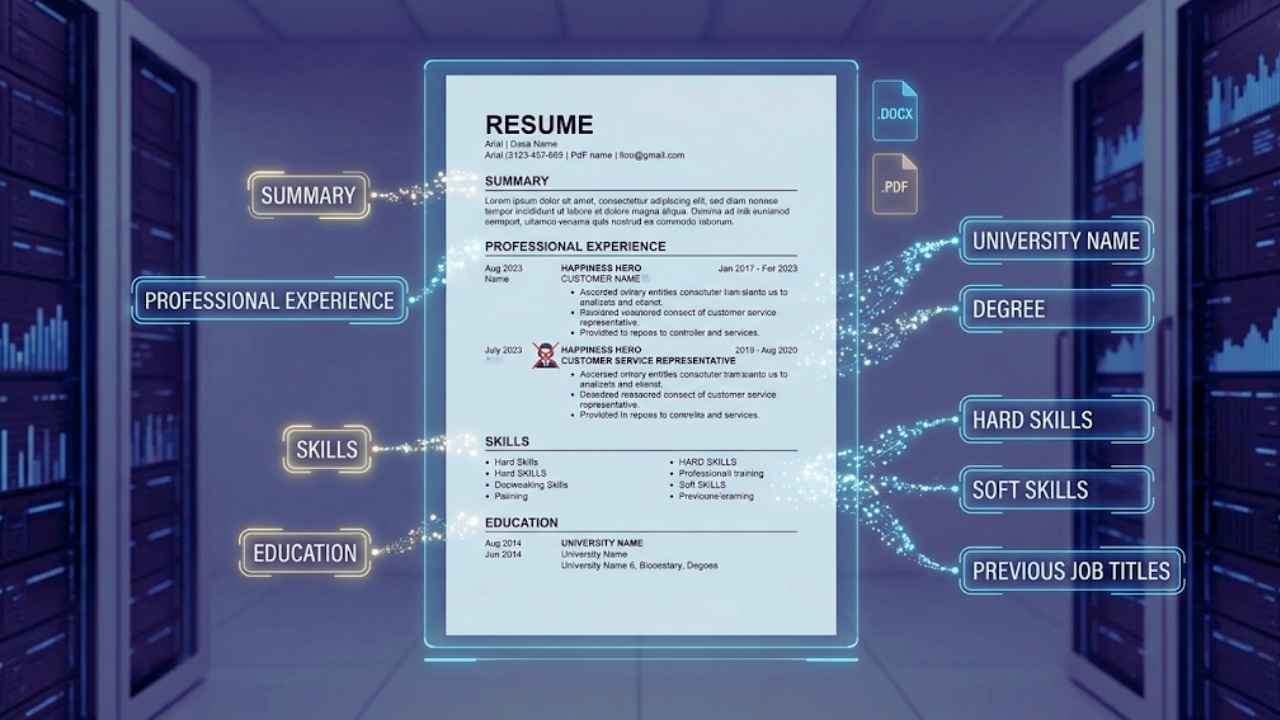
Using standard, universally recognized headings is exactly like giving the bot a clear map of your career history. When the software sees the word Education, it instantly knows to scan the next few lines for university names, degrees, and graduation dates. If you try to be clever and use a heading like Learning and Development, the parser might misunderstand it and misfile your college degree under a random corporate training section. Stick strictly to the basics like Summary, Professional Experience, Skills, and Education.
This ensures that every single piece of data you provide is mapped directly to the correct database field in the recruiter’s dashboard view. Furthermore, avoid using internal, quirky job titles that only your previous company understood. If your official title was Happiness Hero, you need to change it to Customer Service Representative on your document so the bot actually recognizes what you did for a living.
|
Formatting Element |
Recommended Approach |
Reason Why It Works |
|
File Type |
.docx or PDF format. |
These are the most compatible with modern parsing engines. |
|
Fonts |
Standard choices like Arial or Calibri. |
Clean lines prevent automated character recognition errors. |
|
Columns |
Single column layout only. |
Prevents text from being wrongly merged across sections. |
|
Graphics |
Absolutely no icons or images. |
Bots cannot see images and will skip over that data entirely. |
Optimizing Content Without Losing Your Human Voice
Balancing Keywords and Readability
While you are certainly formatting your document for a machine, a real person eventually has to read your work and make a hiring decision. You need to balance extreme technical optimization with a natural, highly engaging tone that tells a good story. Avoid using overly formal, stiff language that makes you sound like a robot spitting out corporate jargon. Use strong active verbs like led, created, designed, or transformed to show clear ownership of your daily work.
This creates a compelling narrative that a human hiring manager will find interesting after the software moves you to the interview pile. The absolute best way to win over both audiences is to use the challenge, action, and result method for your writing. For every bullet point you write, try to quickly describe a problem you faced, exactly what action you took to solve it, and the measurable outcome of your work.
Quantifying Your Impact with Data
Hard numbers are the absolute gold standard for an ATS-friendly resume 2026. If you simply write that you managed a department budget, that is far too vague and does not tell the system how much responsibility you actually handled. If you instead say that you managed a two million dollar annual budget and reduced operational costs by fifteen percent, the AI immediately identifies budget management as a core skill and the percentage as a major success metric.
This data-heavy approach significantly boosts your ranking score because it provides concrete, factual evidence of your performance level. Bots love numbers because they represent measurable data, and recruiters love numbers because they provide immediate proof of your impact on a business. Whenever you can, try to include exact percentages, dollar amounts, team sizes, or specific timeframes to ground your claims in reality.
|
Optimization Component |
How to Execute Properly |
Benefit to Your Application |
|
Professional Summary |
Include 2-3 core keywords naturally. |
Hooks the software and the human reader immediately. |
|
Bullet Points |
Start with an action verb, end with a metric. |
Provides the result data points that AI heavily prioritizes. |
|
Skills Section |
Group by clear categories. |
Makes the document easily scannable for the ranking tool. |
|
Employment Dates |
Use month and year format clearly. |
Helps the AI calculate your total exact years of experience. |
Common ATS Traps to Avoid
Technical Roadblocks to Watch Out For
There are several creative design elements that will get your application tossed directly into the digital trash bin without a second glance. You must avoid these common traps at all costs if you want to remain competitive. Tables and text boxes are major offenders in the modern hiring process. While they might look highly organized to your eye, many parsers see them as blank space or jumbled nonsense characters.
If you want to organize a long list of technical skills, just use simple bullet points or tabs instead of building a hidden table grid. Another incredibly common mistake is using tiny graphics, like a little phone icon next to your phone number or a house icon next to your city. The parser might interpret these little pictures as special characters and corrupt the entire line of text, deleting your phone number from your profile entirely.
The Danger of Fancy Templates
Pre-made templates from popular online graphic design websites are often visually beautiful but incredibly dangerous for job seekers. They frequently use layered text, where one piece of text actually sits invisibly on top of a colored graphic element. An ATS often reads these hidden graphic layers completely out of order, making your professional history read like a scrambled word puzzle.
Many of these modern templates also force you to use progress bars or visual dials to rate your skills, which are completely useless because a bot cannot read a visual graphic that says you are eighty percent proficient in marketing. If you absolutely feel you must use a pre-made template, you have to ensure it is one explicitly designed and tested to be compliant with major tracking software, featuring a completely flat text hierarchy.
|
Potential Trap |
Why it Fails in the System |
Better Alternative Approach |
|
Graphs and Skill Bars |
Bots cannot read visual percentages. |
Use terms like advanced or expert in plain text. |
|
Contact Icons |
May be read as garbled symbols. |
Just type out the words phone or email. |
|
Multi-Column Layouts |
The bot reads straight across the page. |
Use a standard single-column, top-down layout. |
|
Uncommon Custom Fonts |
Character recognition will completely fail. |
Stick exclusively to standard, basic web-safe fonts. |
Step-by-Step Guide to Crafting a Winning 2026 Resume
Analyzing the Job Post and Choosing a Layout
Building an ATS-friendly resume 2026 is not something you do once and forget about; it is a highly intentional process for every job you want. You should start by gathering the job descriptions for the specific roles you are targeting and reading them carefully. Look closely for recurring phrases, required software tools, and specific management skills that the employer repeats.
These recurring items will become your primary keywords. Once you have a solid master list of terms, you can begin tailoring your document to mirror those specific needs while keeping your own authentic voice intact. Start with a completely blank document or a highly verified simple text template. Make sure your margins are set to at least one inch all around so the document breathes easily, and set up your core headings before you write a single bullet point.
Writing a Natural Summary and Detailing Experience
Introduce yourself right at the top using human language while weaving in three or four of the key skills you found in the job description. This short summary paragraph acts as the anchor for the rest of your document. Next, dive into your professional experience section, applying the challenge, action, and result method for every single bullet point under your previous jobs.
Check to make sure your dates are aligned uniformly on the right side of the page so the parser can easily calculate your tenure. Create a dedicated, straightforward skills section near the bottom or top that plainly lists your technical tools without any fluff. Finally, run a plain text test by copying your entire document and pasting it into a basic notepad application. If the text flows perfectly in chronological order without any missing chunks, your layout is clean and ready to go.
|
Step |
Action Item for the Job Seeker |
Purpose of this Action |
|
1 |
Extract exact keywords from the job listing. |
Ensures your vocabulary matches the employer’s needs. |
|
2 |
Verify all contact info is in the main body. |
Prevents contact details from being lost in header margins. |
|
3 |
Replace all tables with simple bulleted lists. |
Guarantees the parser reads the text smoothly. |
|
4 |
Match unique job titles to industry standards. |
Helps the AI correctly categorize your past experience. |
|
5 |
Include at least three measurable numbers. |
Provides the algorithm with concrete performance data. |
Real-World Testing: How to Know if Your Resume Passes
Diagnostic Methods for Your Document
You do not have to just hit the submit button and pray for a good outcome. There are highly effective ways to test your document locally before you ever send it to an employer. The simplest and most accessible method is the plain text extraction test. Just press select all on your keyboard, copy your entire resume, and paste it into a bare-bones text editor like Microsoft Notepad or Apple TextEdit.
Look very closely at the result on the screen. Does the text appear in a logical top-to-bottom order? Are there weird rectangular boxes or question marks where your bullet points used to be? If the plain text version looks messy, out of order, or is missing contact information, you immediately know that the corporate tracking software will struggle to read it just as badly. You must fix your original layout until the notepad test comes out perfectly clean.
Using Third-Party Scanners Effectively
Another highly recommended modern trick is to use dedicated online resume scanning tools that mimic enterprise software. These independent tools act exactly like a mini Applicant Tracking System on your web browser. You paste in the job description you want to apply for, upload your resume file, and the tool compares the two documents instantly. It will give you a specific match rate and highlight exactly which critical keywords you forgot to include.
You should generally aim for a match score of about eighty percent or higher before applying. However, you should avoid trying to get a perfect hundred percent score. If you perfectly match every single word, the system might flag your application as an unnatural copy-paste job, and a human recruiter will definitely notice that it reads like an artificial keyword dump rather than a real person’s career history.
|
Testing Method |
What it Evaluates |
Passing Signal |
|
The Notepad Test |
Parsing logic and reading order. |
Text appears highly legible and strictly chronological. |
|
The Search Test |
Keyword visibility for recruiters. |
Ctrl-F easily highlights all your core skills on the page. |
|
Third-Party Scanner |
Competitive ranking score prediction. |
Achieves a match rate of roughly eighty percent. |
|
Human Peer Review |
Readability and natural tone check. |
A friend understands your core impact within ten seconds. |
Final Thoughts
The ultimate secret to navigating modern hiring technology is not about trying to outsmart a sophisticated machine; it is about making the machine’s job as easy as possible. By intentionally using a clean layout, standard industry titles, and measurable performance data, you ensure that the AI can accurately represent your career history to the hiring manager. Remember that this complex technology is fundamentally designed to find the best possible person for the open role, not just to block people from getting jobs.
Your task is simply to provide that crucial information in a highly organized format that the machine easily understands. Focus heavily on the tangible value you bring to a company and the real results you have achieved in the past. If you do that while following these core formatting rules, your ATS-friendly resume 2026 will consistently bypass the digital filters and land you directly in the interview chair.
Frequently Asked Questions (FAQs) About ATS-Friendly Resume 2026
1. Does my resume need to be exactly one page in 2026?
Not necessarily. While a strict one-page document is absolutely great for early-career professionals or recent graduates, a two-page document is perfectly acceptable and normal for anyone with more than seven to ten years of substantial experience. The software system itself does not care at all about page count, but human recruiters still highly prefer concise, relevant information over endless pages of outdated jobs.
2. Can the ATS read colors or bold text?
Most parsing systems immediately strip away all color, bolding, italics, and special formatting during the initial extraction phase just to grab the raw data. While using a little bit of color or bold formatting is perfectly fine for making the document look nice for the human reader who opens the original file later, it will not help or hurt your actual algorithmic ranking score in any way.
3. Should I include a professional photo on my resume?
In the United States, Canada, and many other western corporate markets, you should strictly avoid using photos of yourself. Many modern systems are programmed to automatically reject any document containing a face to ensure strict compliance with anti-discrimination laws and to avoid massive parsing errors that images often cause.
4. Are buzzwords exactly the same thing as keywords?
No, they are very different concepts. Buzzwords are empty, subjective phrases like team player, go-getter, or hard worker that prove absolutely nothing to the machine. Keywords are highly specific, verifiable skills, software programs, or methodologies like Salesforce management, budget forecasting, or agile development. You should entirely drop the buzzwords and heavily focus on the technical keywords.
5. How often should I update my document for the system?
If you want the best possible results, you need to slightly tweak your document for every single job application you send out. Every individual company uses slightly different language in their job descriptions. If you want to rank at the top of the pile, your document needs to closely mirror the highly specific terminology used by that exact employer.
6. Does saving my file as a PDF ruin the parsing process?
For a long time, the advice was to avoid PDFs, but in 2026, most modern enterprise systems handle standard PDF files perfectly well. However, if a job portal explicitly states that they only accept word documents, you must follow their instructions to the letter, as they might be running a much older legacy system that still struggles with PDF text extraction.