


We all know the drill. You grab a coffee, sit at your desk, and write down 15 things you absolutely have to finish. By 5 PM, you have crossed off exactly three. The rest just roll over to tomorrow. It becomes a vicious cycle of guilt, stress, and low output. To fix this mess, you usually run into one massive debate: time blocking vs to do list.
Both methods promise to organize your chaos. They both claim to save your workweek. But they operate on entirely different logic. One offers total flexibility and lets you work on the fly. The other demands a strict schedule and treats your calendar like a boss.
I have spent years managing content teams, mapping out SEO strategies, and testing every productivity app out there. I know exactly how frustrating it feels to work a full nine-hour day and realize you accomplished nothing of value. Here is the honest truth about what actually works, what fails completely, and how you can take control of your day using recent workplace data. We will strip away the useless buzzwords and look at how human brains actually process work.
What Are We Actually Comparing?
Before declaring a winner, we need to clearly define the tools we are fighting over. These systems tackle your workload from opposite angles, and understanding the core mechanics of each is crucial. A classic to-do list is literally just an inventory. It is a brain dump of action items on a notepad or a digital app. You pick a task, do it, and check the box. You have no set schedule. If a fire starts, you put it out, then return to the list whenever you want. The biggest perk is zero friction.
You think of a task, you write it down, and you move on. But recent data shows a staggering 82 percent of workers operate without a formal time management system, heavily relying on these basic lists. As a result, they feel totally overwhelmed because lists completely lack priority and deadlines.
Time blocking, on the other hand, makes your calendar the ultimate authority. You do not just write down what to do; you decide exactly when you will do it. You block out 9:00 AM to 10:30 AM for one specific project, and during that window, you ignore everything else. When time is up, you stop. It forces reality on you right away. A simple list lets you pretend you can squeeze 30 hours of work into a single Tuesday. A calendar physically stops you from scheduling time you do not actually have.
|
Feature |
To-Do List |
Time Blocking |
|
Core Concept |
Running inventory of tasks |
Calendar-based schedule |
|
Flexibility |
High (do tasks anytime) |
Low (tasks happen at set times) |
|
Setup Effort |
Minimal (just write it down) |
Requires upfront daily planning |
|
Best Suited For |
Errands, reactive jobs, admin |
Deep work, complex projects |
The Science of Task Management and Real-World Data
Let us look at the cold, hard numbers driving the modern workplace. Our brains simply are not built to juggle 20 random tasks simultaneously. When you weigh the time blocking vs to do list debate, workplace interruptions act as the ultimate tiebreaker. Every time you jump from a spreadsheet to a chat app, you pay a massive switching cost. The American Psychological Association notes that shifting tasks eats up to 40 percent of your productive time.
It gets so much worse when you look at current statistics. Recent 2026 data reveals that the average employee is productive for just 2 hours and 53 minutes out of an 8-hour workday. Furthermore, the average focused session at work plummeted to a three-year low of just 13 minutes and 7 seconds. Workers face roughly 275 interruptions a day during core hours. That is one ping every two minutes.
After one single interruption, it takes over 23 minutes to fully regain your deep focus. If you work from a massive list and constantly jump around, you bleed hours of focus every single week. Then there is the Zeigarnik Effect, where your brain fixates on unfinished tasks. Staring at 20 unchecked items creates constant, draining background anxiety.
|
Metric |
The Data & Research |
Daily Impact |
|
Switching Costs |
Up to 40% loss of productive time |
Jumping between tasks wastes hours |
|
Average Focus Time |
Just 13 mins and 7 secs per session |
Deep work is incredibly rare |
|
Refocus Time |
23 mins and 15 secs per interruption |
A quick chat check ruins deep focus |
|
Daily Interruptions |
275 interruptions per average workday |
Constant pings destroy momentum |
Time Blocking vs To Do List: A Direct Comparison
There really is no perfect choice that works universally for everyone. The right pick depends entirely on your specific job role, your daily environment, and how much autonomy you have over your schedule. If your job is highly reactive, simple lists easily win. Think about an IT support specialist or a B2B sales representative fielding inbound calls. You cannot time block a server crash or an angry client calling out of the blue. If you have to drop everything instantly, a categorized list keeps you sane. Checking boxes also gives you a quick dopamine hit to build momentum.
Founders, writers, and software developers, however, absolutely thrive on the block. Office workers face constant interruptions, and if you need high cognitive performance, you cannot do it in five-minute bursts. Mapping out a long-form content strategy or analyzing startup growth metrics requires extended focus.
Time blocking fiercely protects your attention span. It also cures the toxic habit of underestimating how long tasks take. Remote workers who block their time achieve over 22 hours of deep focus weekly, compared to just 18 hours for in-office workers. By reserving specific calendar slots, you force yourself to commit.
|
Scenario / Role |
Winning Method |
The Reasoning |
|
Reactive jobs (Support/Sales) |
To-Do List |
High flexibility needed for emergencies |
|
Complex, deep work (Devs/Writers) |
Time Blocking |
Protects focus from constant interruptions |
|
High volume of minor tasks |
To-Do List |
Quick capture and easy dopamine hits |
|
Chronic procrastination |
Time Blocking |
Forces hard commitment to a specific time |
Popular Productivity Frameworks You Can Steal
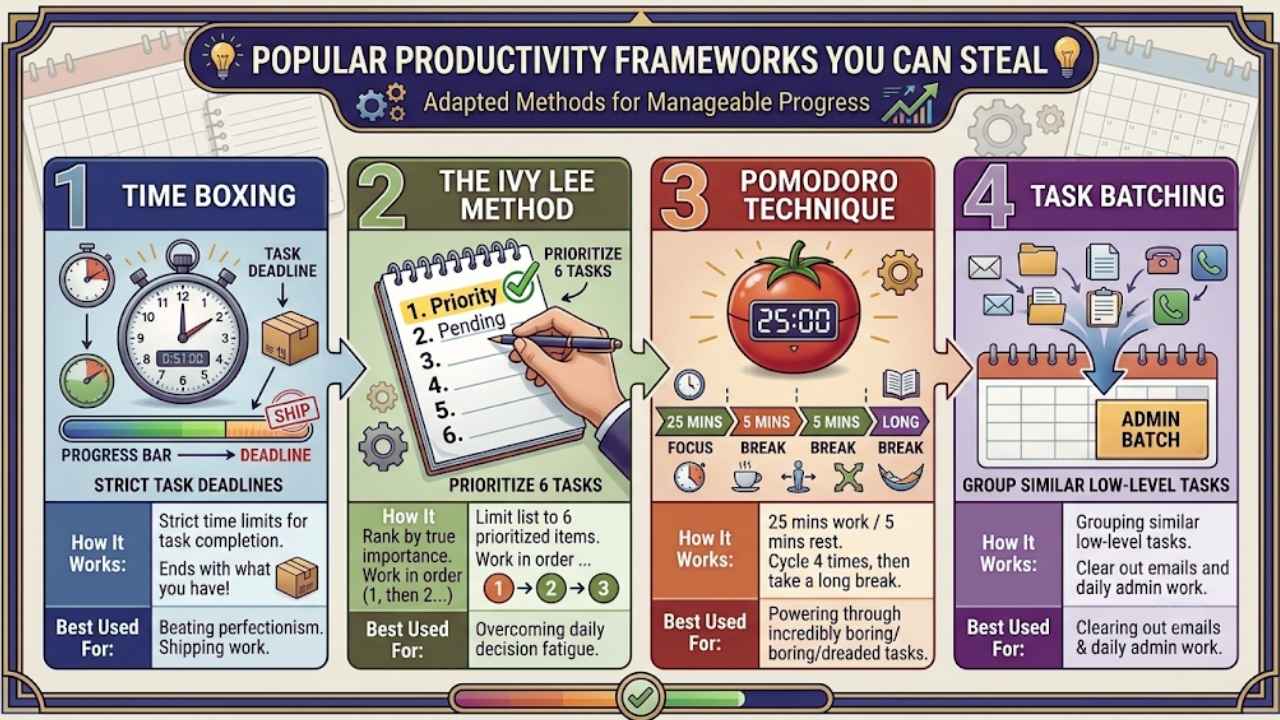
If you are not ready to fully commit to a blank calendar or a blank notepad, you can try several adapted frameworks instead. These proven methods take the best parts of both systems and package them into something manageable. Time boxing is time blocking’s much stricter cousin.
While time blocking says, “I will work on this from 9 to 11,” time boxing says, “I have exactly two hours to finish this, and whatever I have at 11 AM gets submitted.” It kills perfectionism instantly and forces you to ship the work.
The Ivy Lee Method is an old-school list hack that actually works. At the end of your day, write down your six most important tasks for tomorrow. Rank them in order of true importance. In the morning, start on item one. Do not touch item two until item one is completely done. It stops decision fatigue cold. The Pomodoro Technique is another classic. You set a timer for 25 minutes of intense focus, then take a 5-minute break. After four cycles, take a long break. It is absolutely perfect for tasks you dread because anyone can endure 25 minutes of hard work.
|
Framework |
How It Works |
Best Used For |
|
Time Boxing |
Strict time limits for task completion |
Beating perfectionism and shipping work |
|
Ivy Lee Method |
Limit list to 6 prioritized items |
Overcoming daily decision fatigue |
|
Pomodoro Technique |
25 mins work / 5 mins rest |
Powering through incredibly boring tasks |
|
Task Batching |
Grouping similar low-level tasks |
Clearing out emails and daily admin work |
The Hybrid Approach: Best of Both Worlds
Here is the biggest secret in the productivity space: you do not actually have to choose just one. Top-performing professionals always use a hybrid system to manage their weeks. In this setup, the list acts as the “what,” and the calendar serves as the “when.” Start with a massive brain dump. Write down absolutely everything to get it out of your head. Stop wasting precious mental energy trying to remember basic invoices or emails you need to send.
Next, you have to assign a realistic time limit to each item. If you skip this estimation step, your list is just a fantasy wish list. Be brutally honest about how long things take. Then, batch your small tasks together. Do not answer one email at 10 AM and another at 2 PM. Do a massive “Admin Run” all at once to stop context switching. Finally, pick your top three tasks and block them squarely on your calendar.
Drop your admin run into a low-energy time like 4 PM. Most importantly, leave 20 to 30 percent of your day completely blank. That empty buffer is what absorbs late meetings and sudden client emergencies without ruining your plan.
|
Hybrid Step |
Action |
Expected Result |
|
1. Brain Dump |
Write every single pending task down |
Clears mental RAM completely |
|
2. Estimation |
Assign strict time values to tasks |
Fixes poor daily time planning |
|
3. Batching |
Group small tasks like emails and admin |
Kills heavy context-switching costs |
|
4. Scheduling |
Block time for priorities plus a buffer |
Guarantees deep work actually happens |
Common Productivity Traps (And How to Fix Them)
Even the absolute best systems break down if you fall into bad habits. You have to watch out for a few massive traps that ruin a workday. The fastest way to fail is overestimating your capacity. Do not schedule eight hours of back-to-back intense tasks. You are not a robot, and you will burn out fast. Since the average employee only does about three hours of real work anyway, cap your deep work at four hours. Use the remaining hours for emails, meetings, and basic admin.
The next trap is the trash can list. Do not let your daily list grow forever. If a task sits there for three weeks, you are never going to do it. It is just sitting there making you feel guilty. Delete it, delegate it, or do it today. Finally, stop skipping your breaks. Going from a heavy strategy meeting straight into writing complex code requires a mental reset. Block at least 15 minutes between big tasks to grab some water, stretch, and breathe.
|
Common Mistake |
Who Usually Makes It |
How to Fix It Immediately |
|
Zero Buffer Time |
Rigid Time Blockers |
Add 15-minute gaps between big blocks |
|
Task Hoarding |
Constant List Makers |
Delete tasks older than 3 weeks |
|
8-Hour Scheduling |
Rigid Time Blockers |
Cap deep work at 4 hours daily |
|
No Prioritization |
Constant List Makers |
Pick only 3 “Must-Dos” per day |
Final Thoughts
The constant debate over the time blocking vs to do list methods misses the core truth: tools do not do the work for you. A beautiful, color-coded calendar will not fix bad discipline. A slick new app will not give you energy if you are already totally burnt out. But finding the right framework removes massive friction from your workday.
If your day is full of unpredictable fires and constant client calls, stick to a prioritized list. Keep it short and actionable. If you need to grow a business, hit revenue targets, or build complex projects, you have to protect your focus at all costs. In that case, time blocking wins easily. Figure out how you work best, empty your head, and take control of your day.
Frequently Asked Questions (FAQs) About Productivity Methods
Does time blocking work with ADHD?
It varies wildly. Some find rigid hourly blocks completely paralyzing. Others deeply need the external boundaries. Gamified Pomodoro sessions or flexible, energy-based lists often work much better than massive two-hour calendar blocks.
How do I handle a boss who interrupts my blocks?
You have to manage their expectations. Share your calendar actively. Mark deep work as “Do Not Disturb,” but schedule open “Office Hours” for quick chats so your team knows exactly when they can reach you.
Should I schedule personal habits like fitness?
Absolutely. Fitness drives your cognitive performance. Treat a 6 AM gym session exactly like a non-negotiable client meeting. Do not just leave it on a list to be forgotten.
What happens if an emergency ruins my time block?
Do not throw away the whole day. Handle the fire, then look at your calendar. Move the interrupted block to your afternoon buffer time. Shift it, do not delete it.