


We have all been there. You sit through a painfully long video call, watching the clock tick, only to realize at the end that nothing was actually decided. The way we work has changed dramatically over the last few years, but many of our collaboration habits are still stuck in the past.
As we move through 2026, hybrid and remote work are no longer experiments. They are standard operating procedures. Yet the friction caused by poorly managed team syncs continues to drain energy and resources.
If you want to protect your team from burnout and scale your operations successfully, learning how to run effective meetings is a non-negotiable skill. It is about respecting people’s time, making fast decisions, and keeping everyone aligned regardless of their time zone. This complete guide breaks down exactly how to prepare, execute, and follow up on your calendar invites so you can ensure every single minute counts.
The State of Meeting Productivity in 2026
|
Metric |
2026 Data Point |
Impact on Teams |
|
Annual Time Spent |
392 hours per employee |
High risk of burnout and context switching |
|
Unproductive Rate |
71 percent of leaders say meetings fail |
Delayed projects and poor decision making |
|
Remote vs In-Office |
Remote workers attend 80 percent more meetings |
Severe video call fatigue |
|
AI Adoption |
52 percent of organizations use AI transcribers |
Faster follow-ups and better documentation |
The Rise of Meeting Fatigue
Meeting density is increasing much faster than total meeting hours. This means we are having more short meetings rather than fewer long ones. While a quick fifteen-minute sync sounds harmless, having six of them scattered randomly throughout the day completely destroys deep work. Employees are interrupted constantly, making it physically impossible to drop into a state of flow.
For a software developer trying to build out a complex Next.js backend, getting pulled into a midday status sync means losing at least thirty minutes of cognitive momentum. The mental toll of context switching from a demanding design task to a trivial status call and back again is a primary driver of modern workplace exhaustion. Teams are realizing that protecting uninterrupted focus blocks is just as important as the collaboration itself.
The Financial Cost of Wasted Time
Across the global corporate landscape, businesses lose billions annually due to poorly organized and entirely unnecessary sessions. When you pull a team of highly paid professionals away from their focused work to sit on a disorganized call, the financial and operational costs add up incredibly fast. Think about the hourly rate of a senior engineering team, project managers, and lead designers sitting idly while someone struggles to share their screen.
Research shows that for scaling SaaS companies, eliminating unnecessary recurring calls could save massive amounts of capital while simultaneously accelerating monthly recurring revenue growth. Time is literally money, and wasteful calls are burning through budgets without producing any tangible return on investment. Every calendar invite needs to be viewed as a financial investment that requires a concrete return.
Why So Many Meetings Fail?
|
Failure Point |
Core Reason |
The Result |
|
No Agenda |
Lack of pre-planning |
Wandering conversations and wasted time |
|
Overcrowding |
Inviting people just to be polite |
Diluted accountability and quiet participants |
|
Proximity Bias |
Favoring in-person staff over remote |
Remote workers feel ignored and disengage |
|
No Documentation |
Relying on human memory |
Repeating the exact same meeting next week |
The Trap of Recurring Invites
Recurring meetings are the absolute silent killers of organizational productivity. A weekly sync that made complete sense six months ago during a product launch often stays on the calendar long after its actual usefulness has expired. Teams show up strictly out of obligation, spend thirty minutes awkwardly trying to find things to talk about, and leave feeling entirely drained of energy.
If you do not regularly audit your recurring calendar events, you will inevitably end up held hostage to obsolete routines that serve no current purpose. Managers need to embrace the habit of aggressively canceling recurring holds the moment the core project transitions from active development into standard maintenance. Doing an aggressive calendar purge at the end of every fiscal quarter ensures that your team only meets about current priorities.
Poor Documentation and Follow-Up
Research consistently shows that people forget up to half of all new information within a single hour of hearing it. Without a highly dedicated system for capturing final decisions and assigning direct responsibilities, the conversation simply evaporates into thin air. You end up having the exact same circular discussion a week later because absolutely no one remembers what was agreed upon or who was supposed to take the lead on implementation.
Relying on human memory for complex technical specifications or marketing strategies is a guaranteed path to project failure. When a team decides on a specific configuration for their Kafka message brokers, but fails to document it in the follow-up email, the entire architecture stalls while developers wait for clarification. Strong documentation transforms temporary verbal agreements into permanent, searchable company knowledge.
How to Run Effective Meetings: The Pre-Meeting Checklist?
|
Pre-Meeting Step |
Action Required |
Why It Matters |
|
Assess Necessity |
Ask if async works better |
Protects uninterrupted focus time |
|
Set Objective |
Define the exact outcome |
Keeps the conversation entirely on track |
|
Build Agenda |
Outline topics and time limits |
Gives participants time to prepare solutions |
|
Curate List |
Invite only essential personnel |
Prevents the dreaded bystander effect |
|
Check Tech |
Test cameras and software |
Avoids frustrating five-minute delays |
Determine if a Meeting is Actually Necessary
Before you even open your calendar application, stop and ask yourself if this conversation truly requires real-time, synchronous interaction. If you just need to share basic information, report on weekly marketing metrics, or ask a simple technical question, just send an email or drop a message in your team chat. Reserve your live sessions strictly for complex problem-solving, collaborative brainstorming, sensitive human resources conversations, and final strategic decision-making.
Defaulting to a live call for simple data sharing is a sign of lazy management and shows a complete lack of respect for your team’s workflow. Creating a culture where it is socially acceptable to decline unnecessary meetings is the first step toward reclaiming your company’s collective productivity.
Define a Clear Objective and Outcome
Every single session needs a crystal clear finish line so everyone in the room knows exactly when the job is finally done. You should be able to state exactly what success looks like in one simple, highly actionable sentence. For example, rather than saying the goal is to talk about the new software rollout, the objective should be to finalize the deployment timeline and formally assign the primary training leads.
Concrete objectives make it incredibly easy for the facilitator to politely cut off irrelevant tangents and steer the group aggressively back to the core task at hand. When attendees see a specific goal attached to the invite, they are much more likely to show up mentally prepared to contribute to that exact outcome.
Craft a Detailed Agenda
An agenda is your absolute best roadmap to success and should never be considered optional. It transforms a wandering, unpredictable chat into a tight, highly productive strategic session. You need to share your agenda at least a full twenty-four hours in advance so introverts and deep thinkers have adequate time to process the topics internally.
Include the main purpose, the specific points you will cover, the person leading each point, and the strict estimated time allotted for that particular discussion. This preparation shifts the entire dynamic of the room from spontaneous reacting to thoughtful, deliberate problem-solving. It also gives people the opportunity to gather any necessary data or analytics they might need to support their arguments during the call.
Curate Your Guest List Carefully
There is always a strong natural temptation to invite everyone simply to avoid hurting feelings or leaving someone out of the loop. However, overcrowded rooms completely destroy team productivity and lead to incredibly passive behavior. Every additional person you add to the invite dilutes overall accountability and makes it exponentially harder to reach a final consensus.
Categorize your guest list carefully into decision-makers, active contributors, and people who simply need to be informed of the outcome. If someone only needs to be informed, remove them from the live invite immediately and send them the written summary notes afterward to protect their time. A smaller, highly focused group will always accomplish more in less time than a crowded, distracted audience.
Prepare Your Technology and Environment
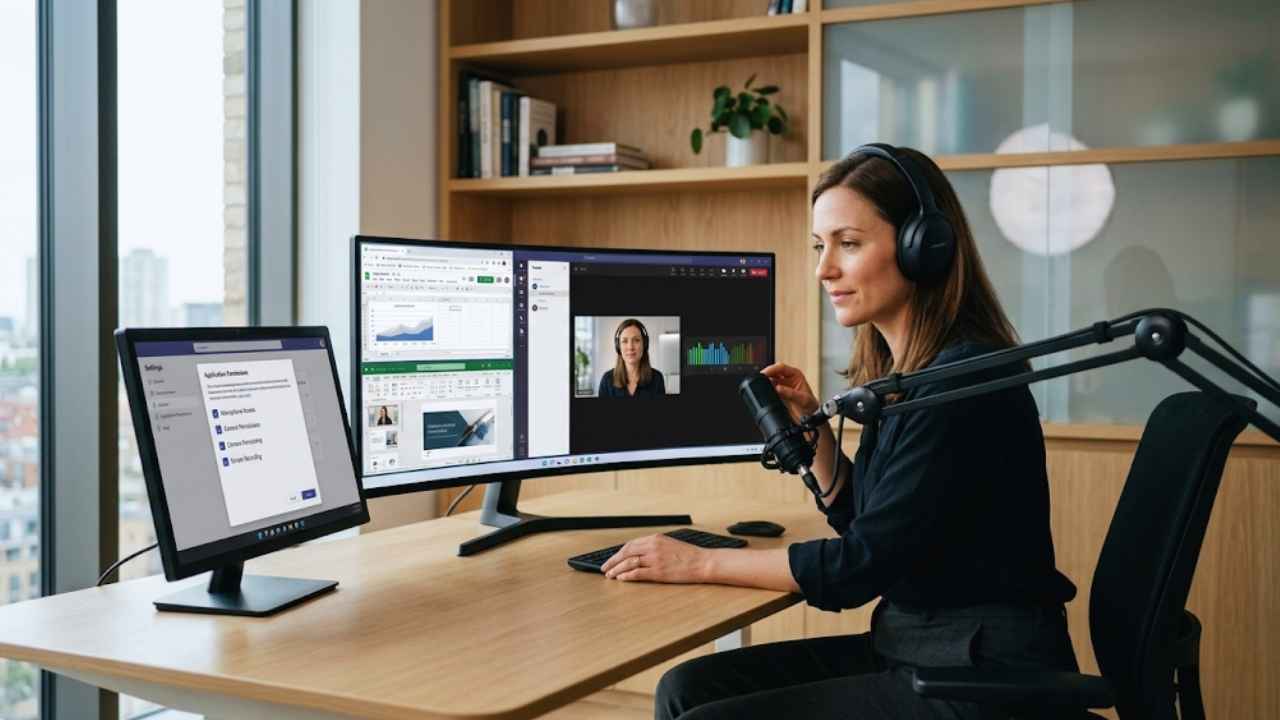
Technical failures kill momentum instantly and set a highly unprofessional tone right out of the gate. In a global hybrid world, you simply cannot afford to spend the first ten minutes asking if people can hear you or trying to figure out how to share your screen. Test your microphone, external camera, and specific application permissions long before the call officially begins.
Ensure your physical background is reasonably clean and your lighting makes your face clearly visible to the remote participants. Open all your browser tabs, spreadsheets, and presentation documents early so you are not frantically fumbling around while a dozen people wait on you. Smooth technical execution shows competence and establishes your authority as the meeting facilitator from the very first second.
Execution: Managing the Room Like a Pro
|
Execution Strategy |
How to Implement |
Expected Outcome |
|
Intentional Check-Ins |
3 minutes of casual conversation |
Builds psychological safety and trust |
|
Equal Participation |
Call on specific individuals |
Prevents loud extroverts from dominating |
|
Hybrid Equity |
Everyone logs in individually |
Levels the playing field for remote workers |
|
Timeboxing |
Cut off discussions at the time limit |
Ensures all core agenda items are covered |
Kick Off With Intentional Check-Ins
Jumping straight into highly intense business matters can feel abrasive, especially for fully remote teams who entirely miss out on casual office chatter. Take the first two or three minutes of the call to do a highly intentional, quick check-in round with the group. You might ask everyone to share a quick professional win from their week or simply ask how their morning project went.
Breaking the ice like this gets people completely comfortable speaking up early in the session. This psychological safety makes them much more likely to contribute later when the actual heavy strategic work begins and difficult opinions need to be shared. It bridges the digital divide and reminds everyone that they are talking to actual human beings, not just avatars on a screen.
Enforce Equal Participation
Silence absolutely does not equal agreement when you are managing a diverse team of professionals. If you have participants who are naturally quiet, you have to actively and deliberately bring them into the fold. Avoid asking broad, open-ended questions to the whole group because the exact same two highly confident extroverts will always dominate the answer.
Instead, direct specific, targeted questions to individuals based on their unique technical expertise or project history. Use digital whiteboards to let people type their ideas completely anonymously if they are hesitant to speak over the louder members of the crowd. A great facilitator acts like an orchestra conductor, ensuring every single instrument gets its proper time to be heard.
Master the Hybrid Meeting Dynamics
If your setup is hybrid, you have to actively fight the inherent proximity bias that naturally favors the people sitting together in the physical room. A great rule of thumb to implement company-wide is that if one person is virtual, everyone should act virtual. Have the people sitting in the physical conference room bring their laptops and log into the call individually with their cameras on.
Always solicit input from your remote attendees first before opening the floor to the people sitting right next to you at the table. This simple structural change prevents the remote workers from feeling like second-class citizens who are merely observing a conversation they cannot truly participate in.
Stick Strictly to the Clock
Respecting people’s time is the ultimate sign of a highly competent and empathetic leader. You have to be absolutely ruthless with the clock regarding your pre-planned agenda items. If you allocated ten minutes to a specific topic and the time is completely up, you must intervene and pause the conversation.
If the group has not reached a firm decision, suggest putting the topic in a shared parking lot document to be addressed in a completely separate, dedicated follow-up. Always try your hardest to end the call at least five minutes early to give people a necessary bio-break before their next calendar obligation begins. Consistent punctuality builds massive trust with your team and proves that you value their overall daily workflow.
The Post-Meeting Protocol: Turning Talk Into Action
|
Post-Meeting Step |
Tool or Method |
Result |
|
Distribute Summaries |
AI transcription tools |
Creates a permanent, highly searchable record |
|
Assign Action Items |
Project management software |
Establishes clear, undeniable accountability |
|
Gather Feedback |
Anonymous pulse surveys |
Highlights specific areas for process improvement |
Distribute AI-Generated Summaries Fast
Taking manual notes actively prevents you from actively listening, observing body language, and fully participating in the core debate. In 2026, you should be heavily leveraging artificial intelligence meeting assistants to do the administrative heavy lifting for your team. These incredible tools automatically transcribe the entire conversation, accurately pick out the key themes, and generate a highly concise summary of the decisions made.
Review the output for general accuracy and send it to all attendees and relevant stakeholders within hours of the call ending. Having this searchable database of past discussions eliminates confusion and provides a perfect onboarding tool for new employees catching up on old project histories.
Assign and Track Action Items
Every single strategic decision needs a designated human owner and a very strict, hard deadline for completion. Ambiguity is exactly where execution goes to die in modern corporate environments. If a critical action item is assigned casually to a whole department, absolutely no one will actually do it because everyone naturally assumes someone else will handle the workload.
The written summary you send out must clearly state exactly who is doing what and by what specific date. Follow up with those specific individuals privately a day or two later to ensure they are fully unblocked and have all the resources they need to hit their targets.
Gather Analytics and Feedback
You simply cannot improve a corporate process that you refuse to measure and analyze objectively. Use the backend analytics provided by your modern workspace platforms to track your entire team’s weekly collaboration load. Are you spending too much collective time on internal status calls versus actual deep client work?
Periodically send out brief, anonymous surveys asking your team to rate the actual effectiveness of your recurring syncs. If a weekly departmental gathering is consistently rated poorly by the attendees, you need to either aggressively restructure the agenda or kill the recurring invite entirely.
The Future of Meetings: Asynchronous Work
|
Async Method |
Live Meeting Alternative |
Benefit |
|
Chat Thread Updates |
Daily Stand-ups |
Saves 15-30 minutes every single morning |
|
Screen Capture Videos |
Process Walkthroughs |
Allows people to watch at faster playback speeds |
Replacing the Daily Stand-Up
Instead of forcing a mandatory morning video call across multiple time zones, high-performing teams are using dedicated chat channels for their daily check-ins. Everyone simply drops a quick, highly formatted bulleted list of what they accomplished yesterday, what they are tackling today, and where they are currently blocked.
This incredibly simple switch saves dozens of hours a month and creates a fantastic written record of daily progress. Managers can review these updates on their own time without interrupting anyone’s morning coding block or writing session. It also completely eliminates the awkward waiting game while team members take turns reciting tasks that could have easily been read in five seconds.
Embracing Video Messaging
Instead of scheduling a massive live presentation just to explain a simple new workflow, modern leaders are recording high-quality screen-capture videos. They send these short visual clips out for the entire team to watch at their own individual pace. Transitioning routine visual updates to asynchronous video formats heavily protects your team’s most valuable deep work blocks.
It drastically reduces overall digital burnout and makes the rare live sessions you do schedule feel highly important and genuinely impactful. When people can pause, rewind, and rewatch technical instructions, comprehension rates skyrocket and simple operational mistakes drop dramatically.
Final Thoughts
Mastering exactly how to run effective meetings is arguably one of the highest leverage skills you can develop in the modern digital workplace. It is not just about adopting the absolute latest AI transcription tool or setting a slightly stricter calendar agenda. It is about fundamentally respecting the limited time, deep focus, and cognitive energy of the talented people you work with every single day.
When you bravely strip away the unnecessary weekly status updates, enforce crystal clear session objectives, and lean heavily into robust asynchronous communication methods, you literally give your team their lives back. Start by auditing your personal calendar tomorrow morning, immediately cancel the recurring syncs that completely lack a clear purpose, and watch your team’s overall daily productivity and general morale absolutely skyrocket.
Frequently Asked Questions (FAQs) About Run Effective Meetings 2026
What is the optimal length for a business meeting?
Shorter is almost always better in corporate settings. Defaulting to 45 minutes instead of a full hour naturally forces people to get straight to the main point and provides a much-needed mental break before the next scheduled call begins. For quick alignment syncs, 15 to 20 minutes is usually plenty of time to get things done effectively.
How can we effectively reduce video call fatigue?
Video fatigue is a real physiological issue caused by intense, unnatural eye contact and the massive cognitive load of reading digital body language on a grid. Encourage strict camera breaks during long sessions, especially when someone is actively presenting a screen. You can also successfully transition some one-on-one internal check-ins to audio-only phone calls.
What tools are essential for hybrid environments?
Hybrid setups require intelligent hardware that perfectly bridges the gap between the physical room and the remote workers. You need wide-angle cameras that automatically frame the active speaker as they move. You also need highly directional microphones that completely eliminate office background noise, and massive wall displays so virtual participants are clearly visible.
How do you handle someone dominating the conversation?
A strong facilitator steps in politely but extremely firmly. You can validate their specific input and immediately redirect the flow of the conversation to someone else. A simple phrase like thanking them for their perspective and directly asking the engineering team for their thoughts shifts the focus incredibly smoothly and opens the floor.
Are daily stand-up meetings still relevant today?
They are only relevant if they are kept extremely brief and focused strictly on massive blocking issues. If a daily stand-up accidentally turns into a highly detailed status report that drags on for thirty minutes, it is completely destroying your team’s early morning momentum. Agile teams find much greater overall success by moving these updates entirely to asynchronous text threads.
Why do some people hate turning their cameras on?
Camera fatigue stems entirely from the highly unnatural feeling of being constantly watched by multiple people. Forcing cameras on at all times can cause severe social anxiety for some excellent employees. It is always best to establish a flexible culture where cameras are encouraged during initial greetings and critical debates, but completely optional during screen sharing.
How do you gracefully decline a meeting invite?
Politely declining a calendar invite requires total transparency and a proposed alternative solution. You can simply state that you are currently heads-down on a major project deadline and ask if the organizer can send over their questions via email instead. If your attendance is truly required, offer a specific time later in the week when your schedule is less dense.