


Work right now is incredibly loud. Slack dings constantly, AI-generated emails pile up, and your calendar looks like a chaotic game of Tetris. You try to sleep, but your brain suddenly reminds you about a broken website link, a looming Q3 tax payment, and a friend’s birthday you almost missed. It kills your focus, spikes your stress, and leaves you exhausted before the day even begins.
Psychologists call this the Zeigarnik effect—our brain’s annoying habit of fixating on unfinished tasks. I used to think I could just power through it, drink more coffee, and remember everything. Spoiler alert: I couldn’t. The harder I tried to hold it all in my head, the more I dropped the ball.
Decades ago, productivity expert David Allen nailed the exact solution: your mind is for having ideas, not holding them.
Get the GTD system explained simply, and it boils down to this: move every single commitment out of your head and into an external system you actually trust. Stop playing mental gymnastics. Start executing. In 2026, with digital distractions everywhere and AI changing how we work, adopting this framework isn’t just a clever life hack. It’s a literal survival skill. Let’s break down how to build a system that actually handles the chaos of modern work.
Why Your Brain Makes a Terrible Office?
Think of your working memory like your laptop’s RAM. It processes information fast, solves immediate problems, and sparks creativity. But it absolutely sucks at long-term storage. When you try to juggle a massive marketing strategy, a doctor’s appointment, and a grocery list all at once, your RAM maxes out. You freeze up.
Every unfinished task you hold in your head acts like an open loop. These loops drain your energy and cause constant, low-grade anxiety. Getting Things Done (GTD) closes them. By dumping every task into an external system, you give your brain permission to stop worrying. Allen calls this state “mind like water.” Throw a pebble in a pond, and the water reacts perfectly to the splash, then calms down. It doesn’t overreact. You shouldn’t either.
Read Also: How to Build a Three-Fund Portfolio for Long-Term Growth
|
The Problem |
How Your Brain Handles It |
The GTD Fix |
|
Storage |
Juggling 50 tasks in your head |
Storing 0 tasks in memory; 100% on paper or an app |
|
Processing |
Stressing over vague problems |
Defining the exact next physical step |
|
Execution |
Reacting to the loudest notification |
Picking tasks based on context and energy |
|
Mindset |
Overwhelmed and reactive |
Calm, focused, and proactive |
The 5 Steps of the GTD System Explained
This method relies on a strict, five-stage workflow. You cannot skip a step. If you write things down but never organize them, you just create a terrifying, unreadable list of anxiety. If you organize perfectly but never review the list, you stop trusting it. Here is how you actually clear the clutter and get your life back.
|
Step |
What You Do |
The Real-World Goal |
|
1. Capture |
Empty your mind |
Write it down immediately |
|
2. Clarify |
Make hard decisions |
Turn vague thoughts into clear actions |
|
3. Organize |
Sort it out |
Put tasks in the right specific buckets |
|
4. Reflect |
Review everything |
Do a strict weekly system check |
|
5. Engage |
Get to work |
Pick a task and crush it |
1: Capture (Dump It All Out)
The golden rule? Capture 100% of it. If you only log 90% of your tasks, your brain knows the system is broken and keeps worrying about the missing 10%. Write down everything: massive project ideas, minor errands, commitments you made in a hallway, and random shower thoughts.
Don’t organize anything yet. Just get it out of your head. Use whatever tool is fastest. In 2026, voice capture is completely changing this step. You don’t even need to type. Just talk to your smartwatch or phone, and let the AI transcribe it into your inbox. Speed is everything here. Get the thought out before you lose it.
|
Capture Tool |
Best Used For |
2026 Trend / Data Point |
|
Voice-to-Text AI |
Driving, walking, random thoughts |
Increases daily capture rate from 14 to 29 items per user |
|
Browser Extensions |
Research, reading, web tasks |
One-click captures directly to digital inboxes |
|
Physical Notepad |
Deep work sessions, meetings |
Zero digital distraction; pure tactile focus |
2: Clarify (Make the Hard Choices)
An inbox full of raw notes is completely useless. You have to process it. Look at every single item and ask, “Is this actionable?” If the answer is No, you have three choices: trash it, file it as reference material, or throw it on a “Someday/Maybe” list.
If the answer is “Yes,” define the very next physical action. “Fix the website” isn’t an action. Email the developer a screenshot of the broken checkout button” is an action.
Here’s the massive game-changer: The Two-Minute Rule. If the next action takes less than two minutes, do it right now. Don’t put it on a list. Tracking a tiny task takes longer than just finishing it. If it takes longer than two minutes, defer it to a list or delegate it.
|
Action Type |
What It Means |
What You Do With It |
|
Trash |
No longer relevant |
Delete immediately |
|
Someday/Maybe |
Good idea, but not right now |
Move to a deferred list |
|
Reference |
Information you need later |
File in a searchable database |
|
2-Minute Task |
Quick win |
Do it instantly; don’t track it |
3: Organize (A Place for Everything)
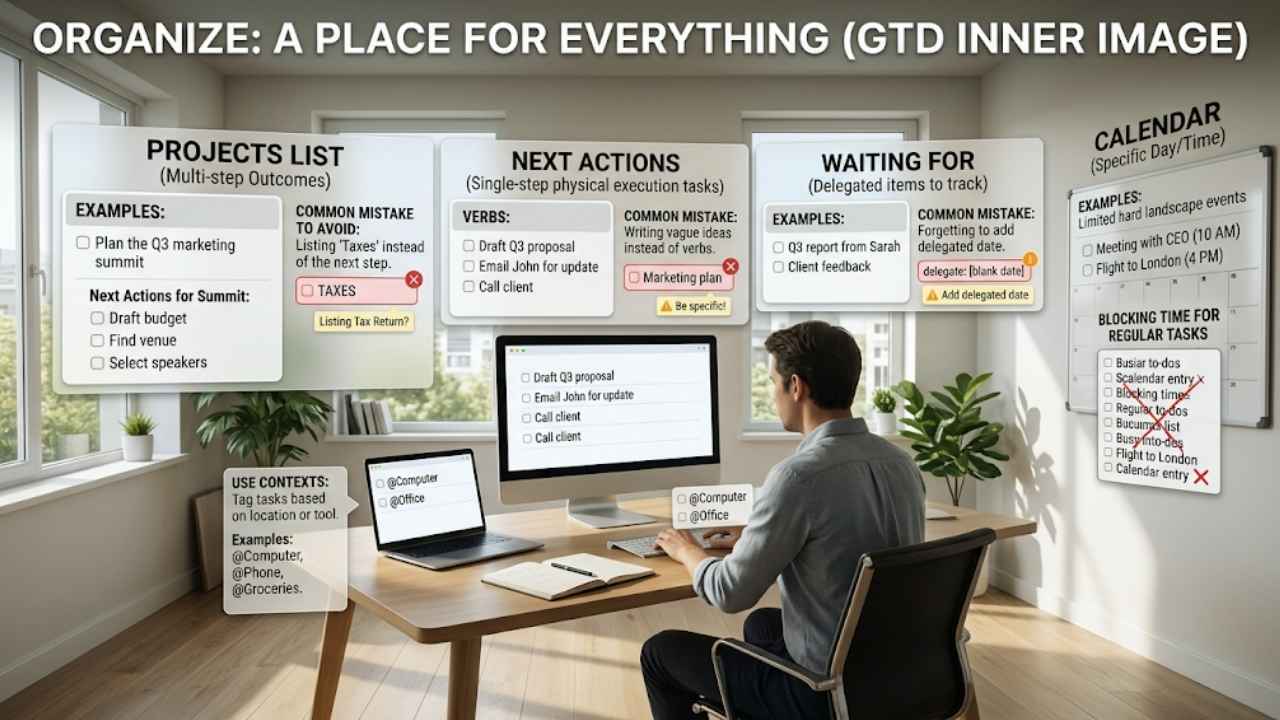
Take those clarified actions and sort them. GTD uses specific buckets to keep things clean and prevent you from feeling overwhelmed.
- Projects: Anything needing more than one step (e.g., “Plan the Q3 marketing summit”). You don’t do projects; you do the action steps attached to them.
- Next Actions: The single-step tasks you actually execute.
- Waiting For: Tasks you delegated and are waiting on someone else to finish.
- Calendar: Things that must happen on a specific day or time. Never put a regular to-do on your calendar. Only add hard landscape items like meetings or flights.
Use contexts. Tag tasks based on where you need to be or what tool you need. If a task requires your office computer, tag it @Computer. You shouldn’t see office tasks while you are buying groceries on a Sunday.
|
Organizing Bucket |
Description |
Common Mistake to Avoid |
|
Projects List |
Multi-step outcomes |
Listing “Taxes” instead of the next step |
|
Next Actions |
Physical steps you can take |
Writing vague ideas instead of verbs |
|
Waiting For |
Delegated items |
Forgetting to add the date you delegated it |
|
Calendar |
Time-specific events |
Blocking out time for regular tasks |
4: Reflect (The Weekly Review)
I’ll be blunt: this is where most people fail. Things move fast, priorities shift, and your system gets messy. If you don’t clean it, it becomes a digital junk drawer. Productivity experts in 2026 call the weekly review the “load-bearing wall” of the gtd system explained. Pull the wall down, and the house collapses.
Once a week, sit down and review everything. Empty your physical and digital inboxes. Check your “Waiting For” list and send follow-ups. Look at every active project and make sure it has a next action. Look at next week’s calendar. This weekly ritual glues the whole method together. Skip it, and you’ll fall right back into chaos.
|
Review Phase |
Action Required |
2026 AI Impact |
|
Get Clear |
Empty all inboxes to zero |
AI pre-routes 78% of items to the right projects |
|
Get Current |
Review active projects and actions |
Auto-flags projects stuck for more than 14 days |
|
Get Creative |
Check the Someday/Maybe list |
AI summarizes related industry news for inspiration |
5: Engage (Execute the Work)
You captured, clarified, organized, and reflected. Now, you just work. You already did the heavy lifting of thinking. You don’t have to waste energy deciding what to do. Look at your lists and filter by your current reality:
- Context: Where are you? (Got your phone and 10 minutes? Check your @Calls list).
- Time: Do you have 15 minutes, or a clear three-hour block?
- Energy: Are you highly caffeinated and fresh, or is it 4:30 PM on a Friday?
- Priority: Based on the above, what gives you the biggest win?
When you strip away the stress of remembering everything, doing the actual work feels incredibly light.
|
Decision Filter |
Question to Ask |
Example Scenario |
|
Context |
Where am I right now? |
Sitting at a coffee shop with only an iPad |
|
Time |
How long until my next hard stop? |
20 minutes until a Zoom call |
|
Energy |
How burned out do I feel? |
Low energy; need mindless work |
|
Priority |
What drives the most value? |
Approving the Q3 budget draft |
Mastering the 6 Horizons of Focus
Productivity isn’t just about answering emails faster. It’s about moving in the right direction. If you only look at daily tasks, you might efficiently climb a ladder leaning against the wrong wall. David Allen built the “Horizons of Focus” to keep your daily grind aligned with your actual life goals.
When you see the gtd system explained at a high level, you realize true control comes from the top down. But you have to master the ground level first. You need daily tasks under control before you have the mental space to plan a five-year vision.
|
Horizon Level |
What It Is |
Real-World Example |
|
Ground |
Next Actions & Calendar |
Draft the B2B SaaS growth metrics report |
|
Horizon 1 |
Active Projects |
Launch the new editorial content strategy |
|
Horizon 2 |
Areas of Focus |
Team leadership, physical health, finances |
|
Horizon 3 |
1-2 Year Goals |
Double organic traffic to the website |
|
Horizon 4 |
3-5 Year Vision |
Become a definitive voice in global tech media |
|
Horizon 5 |
Purpose & Core Values |
Empowering others through accessible knowledge |
You don’t look at Horizon 5 every day. Review your Ground level constantly, Horizon 1 weekly, Horizon 2 monthly, and the higher levels annually.
2026 Realities: AI, Data Trends, and the GTD Tech Stack
The core rules haven’t changed since the book dropped, but the tools definitely have. We don’t use manila folders and physical label makers anymore. Workplaces in 2026 are obsessed with “sustainable productivity”—moving away from toxic hustle culture and focusing on high-leverage outputs. AI is driving this shift.
Data from 2026 shows that users leaning on AI-assisted GTD setups cut their weekly review time from 65 minutes down to just 28 minutes. Why? Because AI handles the triage. Tools like quik.md or Todoist use AI to pre-route captured tasks to the right project with about 80% confidence. AI handles the capture and organize steps, leaving the clarify, reflect, and engage steps strictly to human judgment.
But watch out for the tech trap. I’ve seen people waste a full weekend building a hyper-automated Notion workspace, use it for three days, and abandon it completely. A complex database won’t save you if you refuse to do a weekly review. Keep it simple.
|
GTD Software |
Best Used For |
2026 Market Rating |
|
Things 3 |
Apple users wanting pure, orthodox GTD |
9.1 / 10 |
|
Todoist |
Cross-platform teams needing fast capture |
8.7 / 10 |
|
OmniFocus |
Power users needing advanced perspectives |
8.2 / 10 |
|
quik.md |
Pragmatic users relying heavily on voice AI |
N/A (Emerging) |
Dodging Common Productivity Traps
Even with a perfect playbook, people still trip up. The rules are rigid for a reason. Cut corners, and the whole thing collapses.
The biggest trap? The “fake project.” You write “Taxes” on your to-do list and then ignore it for three weeks. Why? Because “Taxes” isn’t an action. It’s a terrifying concept that causes instant procrastination. The real next action is “Download W-2 from the HR portal.” Break things down until they are so ridiculously small they feel easy to do.
Another massive mistake is using your email inbox as a to-do list. Leaving an email sitting there as a reminder breaks the Clarify rule. You end up reading the same email five times, deciding what to do, and leaving it there again. Read it once, decide the action, put the action on your GTD list, and archive the email forever.
|
The Trap |
The Symptom |
The Quick Fix |
|
Tool Hopping |
Switching apps every month looking for perfection |
Stick to basic text lists. The magic is the habit, not the app. |
|
Fake Tasks |
Items sitting on a list untouched for weeks |
Break it down into a smaller, physical next action. |
|
Inbox Hoarding |
Scanning the same 50 emails daily |
Apply the 2-minute rule, log the rest, and archive the email. |
|
Skipping Reviews |
Feeling stressed and losing trust in your lists |
Block one hour every Friday on your calendar. Guard it with your life. |
Final Thoughts
Reading the full gtd system explained can feel totally overwhelming at first. It forces you to confront every single thing you’ve committed to and make hard, definitive choices. But consider the alternative: living with constant, low-grade anxiety, dropping the ball on big projects, and treating your brain like a chaotic filing cabinet. That takes way more energy.
You don’t need a flawless digital setup today. Grab a blank piece of paper right now. Do a massive brain dump. Write down every single thing bugging you—from the massive startup pivot down to the dead lightbulb in your hallway. Just feeling the physical relief of an empty mind will hook you on the process. In a world built to distract you, mental clarity is your absolute biggest competitive advantage. Go claim yours.
Frequently Asked Questions (FAQs) About GTD System Explained
What if I’m too burned out to rely on my intuition to pick tasks?
When you’re exhausted from a massive week, your ability to “intuitively” pick a task fails completely. Don’t rely on your tired brain. Filter your list for your current context (like @Computer), sort by the lowest energy required, and start at the top. Let the system do the thinking until you recover.
Do tasks really only belong in one context?
Yes. A rookie mistake is tagging a task with multiple contexts so you “don’t miss it.” If you tag a call as both @Office and @Car, you train your brain to ignore the tags because they lose their meaning. One physical context per action. It forces clarity.
Can I let AI decide my priorities in 2026?
Absolutely not. AI routes tasks, summarizes notes, and extracts data. It does not decide what matters to your life or business. The moment you let an AI pick your top three tasks for the day, your productivity system devolves into a recommendation engine. You lose control.
How do I prioritize when everything is on fire?
GTD intentionally avoids A-B-C priority codes because priorities change by the hour. By dumping absolutely everything onto a clear list, the real priority becomes obvious. When you see your full landscape of commitments, your brain naturally spots the highest payoff task in that exact moment.