


Coffee in hand. You open your laptop. Bam. You immediately face forty unread Slack messages, a stalled project, and a confused client. If you run a globally distributed workforce, this is just a regular Tuesday morning. Your lead developer is sipping morning coffee in Tokyo, your marketing head is grabbing lunch in London, and you are just waking up in California.
The workday never actually stops for the company, which means you just pass the stress across continents. Figuring out how to manage remote team time zones often feels like solving a Rubik’s cube that keeps changing colors. I have watched brilliant founders try to force their entire team into a standard office schedule based on their headquarters. It fails every single time. You end up with exhausted designers taking midnight video calls while project managers grow bitter and resentful. Top talent eventually quits because they value their sleep.
The secret to making this global machine work is to stop fighting the clock. You have to drop the ridiculous idea that everyone needs to sit in the same digital room at the exact same time. Managing a global team takes a total shift in how you view human productivity. You need extreme trust, obsessive documentation, and a massive commitment to asynchronous work. Here is exactly how you can stop the scheduling madness, protect your team’s sanity, and finally make global business hours work for you.
The Hidden Costs of Poor Time Zone Coordination
If you try to wing your global scheduling, things break at a fundamental level. Most leaders completely ignore the operational friction until their absolute best employees start handing in their two weeks’ notice. When you treat a distributed team like a traditional office team, you create massive information bottlenecks that paralyze momentum. Let us say a writer in Berlin needs an editor in Los Angeles to approve a final draft before publishing. The writer asks a quick question at four in the afternoon German time, but the Los Angeles editor is still sound asleep.
The editor replies hours later, but by then, the writer is completely offline and cooking dinner with their family. A simple five-minute approval turns into a painful forty-eight-hour delay that drives everyone crazy. This lag kills project momentum completely. Recent data shows that teams spread across four or more time zones take twenty-two percent longer to finish projects when they lack a solid communication protocol. But the human cost hurts your business much worse than the project delays.
When leaders favor the people awake during their own working hours, remote workers in other regions completely panic. They feel forced to adapt by taking late-night calls and skipping family dinners just to stay visible to management. Forcing global synchronization ruins local schedules and makes your team thirty-five percent more likely to suffer from severe burnout.
|
The Core Problem |
What It Looks Like Daily |
The Direct Business Impact |
|
Information Bottlenecks |
Waiting two full days for a basic answer. |
Missed deadlines and projects dragging on significantly longer. |
|
Meeting Fatigue |
Taking video calls at midnight to appease the boss. |
A massive spike in burnout and skyrocketing staff turnover. |
|
Proximity Bias |
Bosses giving good projects only to local staff. |
Unfair promotions creating a toxic and resentful team culture. |
|
Always-On Anxiety |
Feeling forced to reply to late-night chat pings. |
Total boundary collapse and severe emotional exhaustion. |
Master Asynchronous Communication Strategies
Real-time chat is actively killing your team’s ability to focus on deep work. If your company requires everyone to be online at the exact same time to get things done, global expansion will absolutely crush your operations. You need to fully embrace asynchronous communication across every single department. This means sharing information, assigning tasks, and giving feedback without ever expecting an instant reply from your coworkers. Instead of tapping someone on the digital shoulder, you write down the problem in deep detail.
You provide every single piece of context, drop the necessary links, and then let them read it when their workday actually begins. Top-performing remote teams consistently aim for a split of seventy-five percent async and twenty-five percent live communication. Writing things down is not optional; a strong async culture lives and dies by highly detailed project briefs. Never send a direct message that just says you need a second to chat.
Instead, you must send a complete thought detailing where you are stuck, including the code snippet, the error log, and a link to the project ticket. Current workplace habits are fundamentally broken, as data shows the average employee spends fifty-seven percent of their time just communicating and only forty-three percent actually creating. Async workflows fix this imbalance instantly by removing the pressure of instant digital responses.
|
Format Type |
When You Should Actually Use It |
Best Software Tools |
|
Synchronous (Live) |
Complex problem-solving, performance reviews, emergencies. |
Zoom meetings, Slack huddles, direct phone calls. |
|
Asynchronous (Delayed) |
Daily stand-ups, status updates, routine design feedback. |
Notion documents, Loom videos, Asana boards, Jira. |
|
Hybrid Documentation |
Brainstorming sessions that span multiple working days. |
Shared Google Docs, Miro boards, Figma files. |
|
Emergency Broadcast |
Server outages or website crashes requiring instant action. |
PagerDuty alerts, automated SMS blasts. |
Carve Out Dedicated Core Overlap Hours
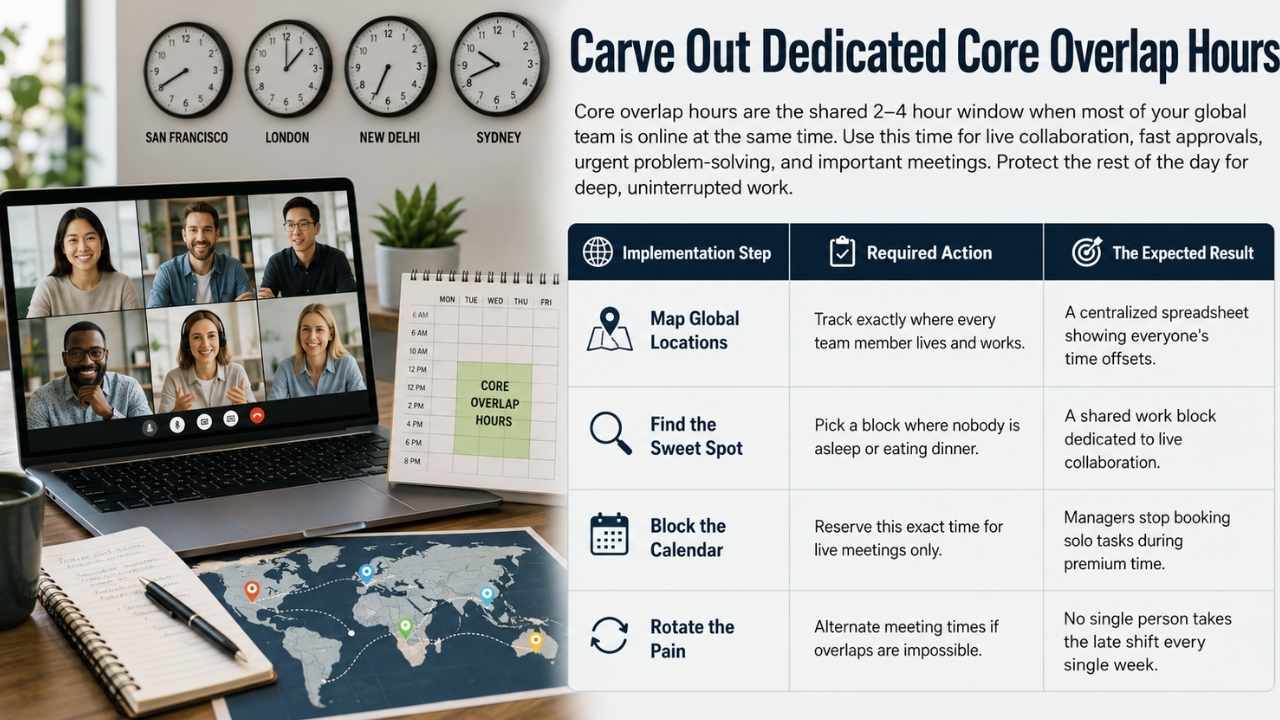
Working entirely asynchronously sounds like an absolute dream, but it usually falls apart when a real crisis hits the company. Humans still need to look at each other occasionally to build deep trust, brainstorm creative solutions, and untangle messy operational problems. This is exactly where core overlap hours save the day and keep your team connected. Think of this specific time block as the golden window for your entire company.
These are the few precious hours when most of your global team is actually awake and working at the exact same time. For a team split across the United States and Europe, this usually hits early morning in America and late afternoon overseas. These specific overlaps matter immensely for team cohesion and speed. Research shows that losing just one single hour of overlapping work time causes an eleven percent drop in live communication among peers.
Teams solve critical problems up to seventy-five percent faster when they have a dedicated, shared work window to hash out details. You must lock down this two to four-hour window strictly for collaborative work, rapid approvals, and vital team meetings. Guard the rest of the day fiercely so your employees can dive into deep, uninterrupted focus work without constant digital interruptions.
|
Implementation Step |
Required Action |
The Expected Result |
|
Map Global Locations |
Track exactly where every team member lives and works. |
A centralized spreadsheet showing everyone’s time offsets. |
|
Find the Sweet Spot |
Pick a block where nobody is asleep or eating dinner. |
A shared work block dedicated to live collaboration. |
|
Block the Calendar |
Reserve this exact time for live meetings only. |
Managers finally stop booking solo tasks during premium time. |
|
Rotate the Pain |
Alternate meeting times if overlaps are impossible. |
No single person takes the late shift every single week. |
Use the Follow the Sun Workflow Model
Dealing with massive time differences does not have to be a recurring operational nightmare. You can actually use these distinct working hours as a massive competitive advantage by using the follow the sun model. Here is exactly how this incredible system works in practice. You strategically pass project work between regions so that forward progress happens twenty-four hours a day without anyone working overtime.
When your American team logs off for the evening, they formally hand the active project over to the team in Asia. When the American team wakes up the next morning, a full day of solid progress is already waiting for them to review. This continuous cycle dramatically slashes your time to market and keeps clients incredibly happy.
Dedicated studies show that teams using a follow the sun setup finish complex projects twenty-two percent faster than local, in-office teams. But you absolutely need military-grade documentation to pull this off successfully. The daily handoff must be completely flawless and highly detailed. If a developer forgets to document a weird software bug before logging off, the next team spends their entire day blocked and completely useless.
|
The Workflow Element |
Single Time Zone Team |
Follow the Sun Team |
|
Daily Progress Output |
Halts completely overnight when people sleep. |
Work happens continuously around the clock. |
|
Customer Support Speed |
Customers wait until morning for any help. |
Real-time global support handles tickets instantly. |
|
Overall Project Speed |
Strictly limited by local eight-hour workdays. |
Delivers final projects significantly faster. |
|
Daily Handoff Process |
Casual and easily forgotten verbal chats. |
Strict written protocols tracked in software boards. |
Beat the Daylight Saving Time Trap
Daylight Saving Time is an absolute logistical nightmare for globally distributed teams. The United States and parts of Europe observe these clock changes, but most of the world completely ignores them. To make matters significantly worse, the specific dates when clocks change vary wildly depending on the exact country.
If you ignore these shifts, your carefully planned overlap hours will completely implode twice a year. An early morning meeting in New York that perfectly matched the evening in Tokyo suddenly shifts an hour, ruining your developer’s quiet night. Small technical tweaks to your calendar systems fix this massive headache instantly. Testing shows that teams leaving their time zone detection settings on default experience significantly more confused messages asking about meeting times.
You must actively anchor your company scheduling to standard identifiers rather than vague regional names. These specific identifiers automatically track historical clock rules and automatically adjust your recurring meetings without human intervention. Always mandate calendar tools that automatically show the viewer’s local time so nobody does mental math to join a basic call.
Read Also: Best Tools for Remote Teams in 2026: Honest Comparison
|
Survival Strategy |
How to Execute It Properly |
Why You Desperately Need It |
|
System Integrity Tests |
Test reports two weeks before clock changes. |
Stops automated server crashes tied to local clocks. |
|
Calendar Audits |
Review all recurring meetings every Spring and Fall. |
Catches meetings that suddenly land during sleep hours. |
|
Standard Identifiers |
Use specific city tags in all calendar events. |
Automates the global time shift completely seamlessly. |
|
Over-Communicate Shifts |
Remind the entire team a week before the shift happens. |
Stops folks from logging into completely empty video rooms. |
Set Bulletproof Response SLAs to Manage Remote Team Time Zones
Total ambiguity regarding communication causes massive daily anxiety for remote workers everywhere. If you drop a direct message to a coworker late on a Sunday evening, your team instantly wonders if they need to reply right away. You must completely kill this terrible guesswork by setting strict service level agreements for all internal company chats. Tell everyone exactly how fast they need to reply based on the specific software tool they are actively using.
When you write these core rules down clearly, people finally stop feeling guilty about closing their laptops and logging off for the night. To successfully manage remote team time zones, you have to clearly separate reading a message from actually replying to it. Teach your entire team to use the schedule send button for every single non-urgent message.
If you are working late and get a brilliant idea for your designer, schedule the message to arrive precisely when their morning shift starts. You must actively stop waking your valuable employees up with panic-inducing digital notifications. Always attach a highly specific time and geographic zone to your deadlines so everyone knows exactly what you expect.
|
Communication Platform |
Expected Reply Turnaround |
What It Actually Means for Staff |
|
Project Task Boards |
Within one to two business days. |
Normal workflow meant to unblock peers upon login. |
|
Standard Email |
Within twenty-four full hours. |
Used strictly for non-urgent stuff and client chats. |
|
Internal Chat Apps |
By the end of the local workday. |
Quick questions where absolutely no instant replies are expected. |
|
Phone Calls and Texts |
Under fifteen flat minutes. |
True critical emergencies like a total website crash. |
Pick the Right Software Tools for the Job
Your human brain cannot reliably calculate the exact time difference between Sydney and Berlin while you are also trying to run a profitable business. You must let dedicated software do the heavy lifting for your entire team. You need to immediately ditch legacy tools that demand instant replies and invest heavily in platforms built purely for asynchronous transparency. Video messaging is arguably the absolute biggest game-changer for any distributed team operating today.
Instead of aggressively trying to coordinate a live meeting just to show off a new app design, you just hit record on your screen. The massive global shift to asynchronous video communication is completely transforming how businesses operate. Recent usage data proves that millions of asynchronous videos successfully replaced hundreds of millions of unnecessary live meetings last year alone.
You get all the emotional nuance of a human voice and body language without the total scheduling nightmare. Just record a five-minute walkthrough, drop the link in your team chat, and let your team watch it on fast speed tomorrow morning. Make absolutely everyone put their working hours in their calendar profile to completely block terrible meeting requests.
|
Software Tool Type |
Primary Use Case |
Why Your Global Team Needs It |
|
Time Zone Math Apps |
Visually mapping out overlapping daylight hours. |
Stops you from accidentally booking midnight meetings. |
|
Async Video Platforms |
Recording screen walkthroughs and quick updates. |
Kills the dreaded quick sync meeting forever. |
|
Digital Knowledge Bases |
Storing standard operating procedures and core rules. |
Creates one massive source of truth so nobody guesses. |
|
Smart Calendar Booking |
Automating meeting scheduling via simple links. |
Automatically blocks meetings outside of local hours. |
Build Actual Human Culture Across Borders
Working remotely gets incredibly lonely if you do not actively manage the social experience. When you completely strip away the office kitchen, the random coffee runs, and the casual desk chats, the daily work feels incredibly transactional. Current workplace data clearly shows that over forty percent of remote workers deal with regular feelings of deep isolation. You have to engineer genuine human connection intentionally, or your people will turn into faceless cogs who eventually quit.
Automate non-work chats by using smart software integrations to randomly pair team members for short virtual coffee dates during overlap hours. You must build dedicated digital spaces exclusively for life outside of the standard daily work tasks. Make specific channels for posting about pets, baking bread, or playing video games on the weekend.
Tell people to frequently share random photos of their local coffee shops or morning walking routes. Because this sharing is completely asynchronous, a developer drops a hiking photo and a marketer reacts to it many hours later. These tiny, consistent touchpoints actively build massive mutual trust among people who have never met in person.
|
Async Culture Tactic |
How to Execute It Properly |
Why It Builds Incredible Trust |
|
Weekly Video Recaps |
Everyone posts a short Friday video recap of their week. |
You see actual faces and hear voices without syncing schedules. |
|
Virtual Coffee Chats |
Random short chats during the golden overlap hours. |
Completely breaks down strict walls between different departments. |
|
Dedicated Hobby Channels |
Chat spaces just for pets, good food, and fun travel. |
Creates universal touchpoints that easily beat geography. |
|
Floating Holiday Time |
Let folks pick their own time off for local holidays. |
Stops forcing foreign staff to care about specific holidays. |
Final Thoughts
Learning to manage remote team time zones is not simply about downloading the perfect calendar application or hacking your daily schedule. It is about completely rewiring how you actively judge business success and human productivity on a global scale. You must stop measuring physical presence and start measuring actual creative output.
When you aggressively build a company culture rooted in clear writing, deep personal trust, and rigid boundary setting, the physical miles between your employees simply do not matter anymore. Give your dedicated team the absolute best asynchronous tools available on the market today.
Tell them exactly when they need to be online and guard their deep focus time like your entire business depends on it. If you stop fighting the relentless clock, you will instantly tap into a truly elite global talent pool. You will seamlessly build an unstoppable machine that runs incredibly smoothly while you sleep soundly.
Frequently Asked Questions (FAQs) About Manage Remote Team Time Zones
How do you fire someone across a massive time difference?
Never fire someone asynchronously. Never do it over text. Even if a manager has to wake up at 4 AM to catch the employee’s local afternoon, you must handle terminations via a live video call. It is basic professional respect.
What exactly is the “Golden Hour”?
The golden hour (or golden window) is the 2-to-4-hour block where your global team’s working hours overlap. You protect this time fiercely. Use it strictly for collaborative tasks, live meetings, and rapid decisions.
Should my global team just run on UTC?
For your tech stack, absolutely. Server logs, code pushes, and legal contracts should run on UTC to stop massive errors. But for talking to humans? No. Mentally converting UTC to local time all day is exhausting. Just use local times in chat (e.g., “Deadline is 3 PM EST / 8 PM GMT”).
Does rotating meeting times actually help?
Yes, but only if you do it carefully. Rotating ensures one person doesn’t always take the midnight shift. But if you change it constantly, you destroy personal routines. If a parent has a 9 PM call one week and a 6 AM call the next, their childcare schedule falls apart. Rotate slowly, like once a quarter.