


We have all been there. You sit down at 9:00 AM, coffee in hand, ready to crush a big project. You finally find your rhythm. Then, Slack pings. A minute later, a calendar invite pops up for a quick sync. By 5:00 PM, you have talked to 12 people, answered 50 messages, and finished exactly zero actual work.
This frustrating loop happens when companies force old-school office habits into a modern distributed setup. The fix is not a slicker video app. We need to change how we talk entirely. Embracing async communication and remote work is the only real way to scale a team without burning everyone out. “Async” means you send a message and do not expect an immediate reply. You give people space to read, process, and answer on their own time. It sounds simple. But it takes massive discipline and clear boundaries. Let’s look at how the best remote companies pull this off every day using real data.
The Real Deal with Async Communication Remote Work
Most companies still run on synchronous, real-time chat. If you need something, you call a meeting. When teams went remote in 2020, managers panicked. They replaced physical shoulder taps with endless instant messages. They digitized the interruptions. Real async communication in remote work treats time differently. It protects deep work. In an async setup, your default move is writing things down. You document a problem, propose a solution, attach the data, and tag the right people. They read it when they finish their current task. Nobody drops what they are doing for a passing thought.
Recent data shows 64% of remote workers prefer this exact workflow for status updates, rather than live meetings. They want the freedom to manage their own schedules. Mastering async communication in remote work means trusting your team. You stop measuring productivity by email response times. You measure it by actual output. Remote workers currently attend 80% more meetings per week than in-office workers, hitting an average of 25.6 meetings per week. This volume is simply unsustainable. Companies like Buffer and GitLab operate fully remote workforces across multiple time zones by leaning heavily into this exact philosophy.
|
Feature |
The Old Way (Sync) |
The New Way (Async) |
|
Response Time |
Immediate expectation |
Delayed window (12 to 24 hours) |
|
Default Format |
Meetings and video calls |
Written docs and video clips |
|
Decisions |
Lived in a room |
Made via structured comments |
|
Who Wins |
The loudest voice |
The best written argument |
Why Instant Replies Kill Your Focus
Let us look at the true cost of being constantly available. Every instant message breaks your focus. If you get pinged three times an hour, you never actually enter deep work. The meeting stats are just as bad. The average remote employee sits through nearly 26 meetings a week. Most of them are useless. Seventy percent of professionals report their meetings are completely unproductive. These pointless gatherings waste time and drain energy.
When you remove the pressure to reply instantly, work quality skyrockets. People stop firing off half-baked answers just to clear their notifications. They take an hour, review the data, and give a solid response. Furthermore, 49% of remote professionals experience significant video call fatigue on a weekly basis, and back-to-back video meetings increase stress biomarkers by up to 20% compared to in-person meetings. If you know you will not get a reply for six hours, you stop sending lazy messages like “Hey, quick question.” You learn to give full context upfront.
|
The Problem |
The Async Fix |
The Verified Result |
|
Constant distractions |
Dedicated message-checking blocks |
More deep work gained daily |
|
Reactive, bad answers |
Time to research before replying |
Better problem solving |
|
Meeting overload |
Written weekly updates |
Fewer wasted payroll hours |
|
Notification fatigue |
Default muted notifications |
Lower stress biomarkers |
The Tech Stack for Distributed Teams
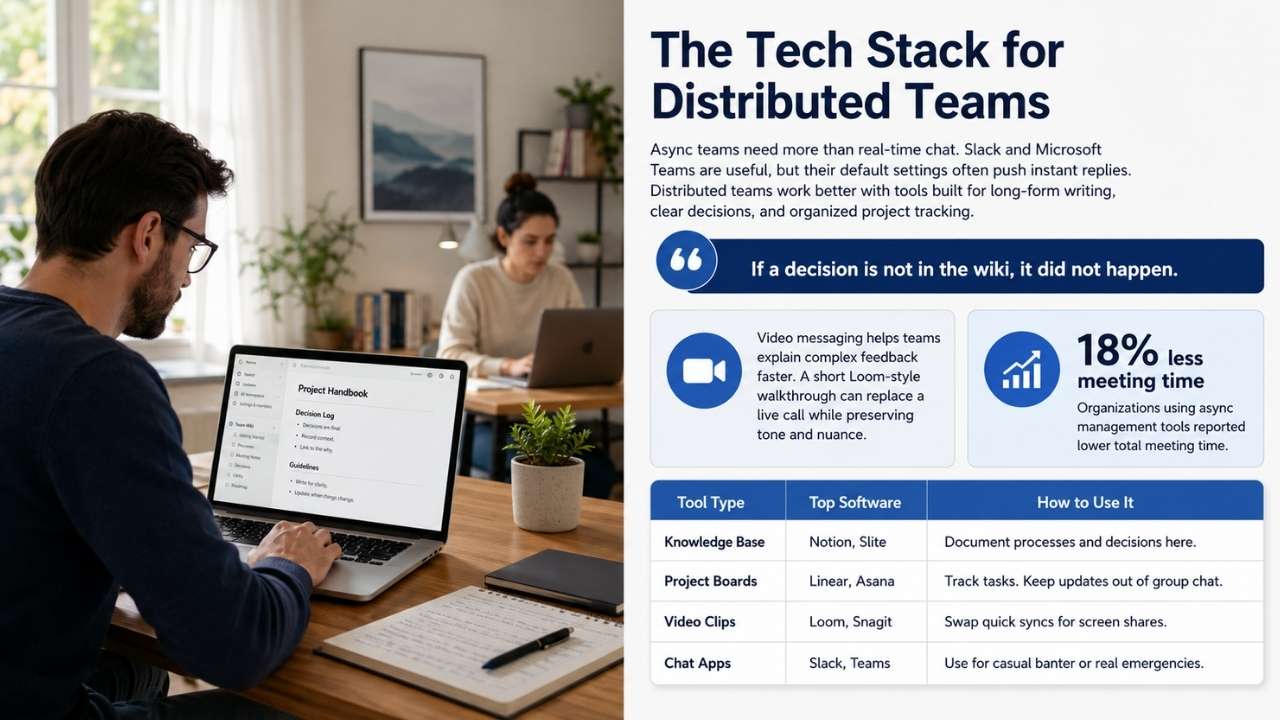
You cannot run an async team on tools built for real-time chatter. Slack and Microsoft Teams are fine, but their default settings push you to reply instantly. You need a tech stack built for long-form writing and clear project tracking. Centralized wikis and project boards become your company’s brain. Tools like Notion, Slite, and Confluence are game-changers. If a decision is not in the wiki, it did not happen.
Video messaging is the secret weapon here. Sometimes, typing out complex feedback takes an hour. Recording a three-minute Loom video walking through a design takes a fraction of the time. The recipient watches it at double speed later. You capture tone and nuance without the nightmare of scheduling a live call. Organizations that adopted these specific async management tools reduced total meeting time by 18%.
|
Tool Type |
Top Software |
How to Use It |
|
Knowledge Base |
Notion, Slite |
Document processes and decisions here. |
|
Project Boards |
Linear, Asana |
Track tasks. Keep updates out of group chat. |
|
Video Clips |
Loom, Snagit |
Swap quick syncs for screen shares. |
|
Chat Apps |
Slack, Teams |
Use for casual banter or real emergencies. |
Writing Your Team Charter
You cannot just tell people to stop replying so fast. If the CEO emails late at night and praises weekend workers, the team will stay glued to their keyboards. You have to put the rules in writing. We call this a communication charter. A charter clearly states expected response times. For instance, project board tags might need a 24-hour turnaround, while emails get 48 hours. If the website crashes, you use a dedicated emergency line, like PagerDuty or a phone call.
It also defines what actually deserves a live meeting. Rule of thumb: never hold a meeting just to read slides. Status updates go in writing. Save live meetings for tough debates, sensitive feedback, or team bonding. Apply this rule, and watch 80% of your calendar clear out. Without a charter, you end up like the 80% of remote workers who still feel immense pressure to respond to messages immediately, even when using nominally async channels.
|
Communication Setup |
Best Tool |
Expected Turnaround |
|
General Updates |
Company Wiki |
Read by end of the week. |
|
Project Work |
Asana / Trello |
Next business day (24 to 48 hours). |
|
Watercooler Chat |
Slack |
Whenever; totally optional. |
|
Real Emergencies |
Phone / PagerDuty |
Drop everything and answer. |
The Hidden Traps And How to Fix Them
It is not a flawless system. Transitioning to heavy text-based workflows exposes some raw nerves. The biggest hurdle is that a lot of smart people are terrible writers. When you rely on written memos, vague writers become bottlenecks. You have to train your team to write clearly, use formatting, and highlight action items. Isolation is another real threat. Without the casual office banter, people feel disconnected. You have to design social moments on purpose. Schedule virtual coffees, create hobby chat channels, or plan annual in-person retreats.
Finally, micro-tasks move slower. A five-minute phone chat might turn into a two-day written thread. But you trade micro-speed for macro-efficiency. The single task takes longer, but the whole project finishes faster because nobody is stuck in meetings all week. Context loss is also a major risk. When decisions made on a live call are not documented, team members who missed the call have no reliable way to get the context without interrupting someone.
|
The Roadblock |
Why It Happens |
The Fix |
|
Bad writing |
Lack of practice |
Use strict templates for proposals. |
|
Loneliness |
No face-to-face time |
Host weekly, work-free social calls. |
|
Endless text threads |
Topic is too complex |
Use the 3 strikes rule; switch to video. |
|
Context loss |
Unrecorded decisions |
Auto-record and summarize all meetings. |
Measuring Output, Not Hours
How do you know people are working if you cannot see them? You look at what they build. This is a tough mental shift for old-school managers. Stop watching green status dots on Slack. Stop counting hours. When you build an async communication remote work culture, you measure outputs. Code shipped. Articles published. Tickets closed. If an engineer finishes their work by Thursday and takes Friday off, a good manager celebrates that.
To make this work, goals must be crystal clear. Use OKRs or tight KPIs. Everyone needs to know what success looks like. When expectations are clear, you do not micromanage the journey. You just check the destination. A staggering 62% of remote workers report that forced camera-on policies contribute to fatigue. By focusing strictly on the final output instead of visual presence, you eliminate this massive source of burnout entirely.
|
Metric |
Old Office View |
New Async View |
|
Performance |
Hours logged |
Projects finished, deadlines hit |
|
Updates |
Weekly 1-hour meetings |
Friday written recaps |
|
Trust |
Earned by looking busy |
Given by default, verified by results |
|
Reviews |
Based on visibility |
Based on hard metrics |
The Handbook-First Culture
You cannot win at remote work without a crazy dedication to documentation. When teams span time zones, they cannot wait 12 hours for a manager to wake up and answer a simple question. They need a place to find the answer themselves. GitLab pioneered this. Their company handbook is massive and public. It covers everything from PTO requests to code deployment. If someone asks a question twice, the answer goes into the handbook.
This acts as your single source of truth. It speeds up onboarding because new hires just read the guides. It kills the anxiety of feeling out of the loop. When decisions live in a central wiki, you never worry about missing an update while you sleep. The documentation burden shifts from a discipline you have to enforce to a default you have to opt out of.
|
Why Handbooks Rule |
Impact on Remote Teams |
Real Results |
|
Self-Serve Info |
Unblocks global workers |
Kills the waiting delay |
|
Fast Onboarding |
New hires learn solo |
Gets people up to speed weeks faster |
|
Transparency |
Aligns the whole company |
Cuts out toxic office politics |
|
Consistency |
Standardizes tasks |
Better quality work across the board |
Final Thoughts
You cannot fake this setup. If you tell your team to adopt this workflow but still praise the guy answering emails at midnight, nothing changes. Mastering async communication in remote work takes time, strict boundaries, and serious trust in your people. When you get it right, the payoff is massive.
Your team gets their focus back. Work quality shoots up. People stop dreading Mondays. Stop worrying about how fast your team talks, and start focusing on how well they work.
Frequently Asked Questions (FAQs) About Async Communication Remote Work
Is this bad for extroverts?
Not at all. Extroverts get energy from people, but eight hours of Zoom calls drains them just like anyone else. Freeing up their schedule lets them spend energy on high-quality interactions or local social events after work.
How do we handle emergencies if notifications are off?
You build an escalation path. You do not ignore fires; you define what a fire actually is. If the payment system dies, call the engineer. If a manager abuses the emergency line for a status update, they lose trust. Protect the emergency channel fiercely.
What if someone gets completely stuck?
Set up office hours. A lead developer might block out one hour daily for live troubleshooting. Junior folks save their roadblocks for that window instead of interrupting the senior dev all day long.
Does this make the company feel robotic?
Culture is more than sharing memes. A strong culture is built on respect, clear goals, and trusting adults to manage their time. Cut the constant interruptions, and people are usually much happier when they do chat live.